Timesheets Overview
Review, approve, and manage your tracked coding sessions before adding them to invoices.
The Timesheets page is your central hub for reviewing tracked sessions and preparing them for invoicing. It provides a streamlined workflow from raw tracked time to billable work items.
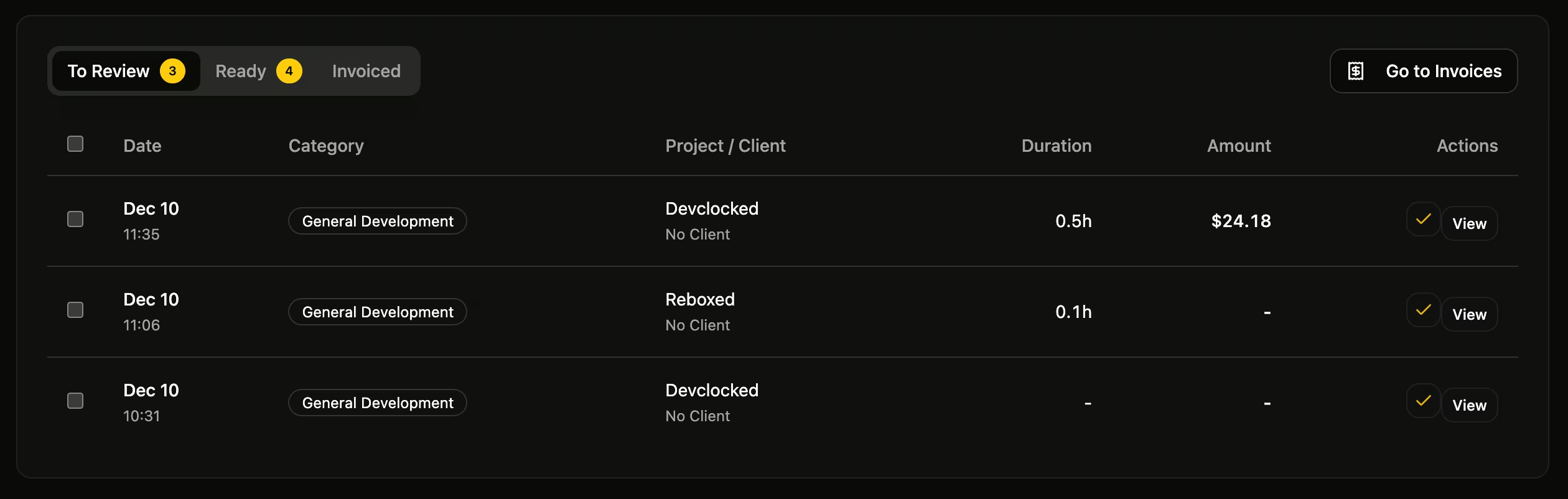
Understanding the Tabs
Timesheets organizes your work items into three stages:
- To Review — Sessions awaiting your approval. These are automatically synced from your tracked activity.
- Ready — Approved sessions ready to be added to an invoice.
- Invoiced — Sessions that have been included on an invoice.
Syncing Sessions
Click the Sync button (refresh icon) in the header to pull in new tracked sessions. This aggregates your recent activity from VS Code, Chrome, and inferred sessions into billable work items.
Summary Cards
At the top of the page, you'll see three summary cards:
- To Review — Total hours pending approval
- Ready to Invoice — Dollar amount approved and ready for billing
- Invoiced This Month — Amount already invoiced in the current month
Filtering
Use the dropdown filters to narrow down work items by:
- Client — Show only items for a specific client
- Project — Filter by project
- Date Range — Today, This Week, This Month, Last 30 Days, This Year, or Custom
Was this page helpful?