Download the app
DMG installer, under 20MB. Drag to Applications. Takes 30 seconds.
Mac app for developers
A macOS-native app that lives in your menubar, watches for coding activity across your IDE, terminal, and browser, and tracks your time without interrupting your flow.
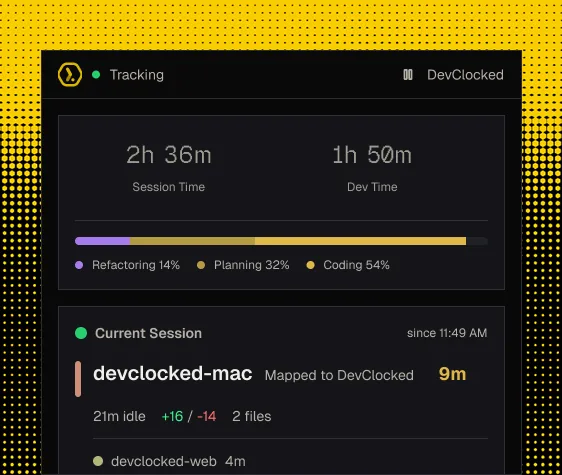
Electron trackers eat 200-400MB and feel foreign on macOS. Web-only trackers need a browser tab open. DevClocked is different, native, silent, automatic.
DMG installer, under 20MB. Drag to Applications. Takes 30 seconds.
Paste your API key into the login screen and the daemon starts automatically.
The daemon detects VS Code, Cursor, Terminal, and Claude Code activity in the background.
Expanded View
Full desktop view with session history, line and token stats, language breakdowns, and everything you need to understand your work day.
Sessions
Todaydevclocked-marketing
devclocked/devclocked-marketing · feat/mac-app-page
3h 49m
9:14 AM
Lines
+2,102/-33
Tokens
105 in / 41.3k out
Languages
devclocked-trackers
devclocked/devclocked-trackers · fix/sidecar-restart
2h 11m
7:03 AM
devclocked-api
devclocked/devclocked-api · main
0h 34m
6:29 AM
Automatic detection
DevClocked's sidecar daemon monitors your system for coding activity, file changes in project directories, IDE process activity, and terminal tool usage. When it detects you're coding, it starts tracking. When you stop, it pauses. No buttons, no commands, no interruptions.
Daemon status
Session sources
Multi-source sessions
Switch from VS Code to Terminal to Chrome, the Mac app keeps your session alive. Activity from any source prevents idle timeout. You get one continuous session, not fragmented entries from different tools.
Native performance
The DevClocked Mac app uses Tauri (Rust + native WebView) instead of Electron. The result: under 50MB memory, instant startup, and a menubar-only presence that doesn't eat your battery or slow down your system.
Memory comparison
Everything you need to know about DevClocked
macOS 13 (Ventura) and later. The app uses native macOS APIs for menubar integration and process detection.
They complement each other. The VS Code extension provides deep file-level tracking (active time per file). The Mac app provides broader system-level detection (Terminal, Claude Code, other IDEs). Both feed the same session — use one or both.
Under 50MB typically. The Tauri/Rust architecture means it uses 3-5x less memory than equivalent Electron apps. It's designed to be invisible to your system resources.
Not yet. The Mac app is our first desktop release. Windows and Linux versions are on the roadmap. In the meantime, the VS Code extension and terminal daemon work on all platforms.
Get The App
Install once. It lives in your menubar. Every session, captured automatically. Free 7-day trial. No card needed.
Download for MacNative menubar capture that starts the moment you start coding. No timers, no buttons.